RxDC Reporting
· Mar 13, 2026

Another round of prescription drug data collection (RxDC) reporting is just around the corner. Annual reporting is required by June 1 of each year containing data from the previous calendar year (the “reference year”), meaning reporting for the data from 2025 will be due June 1, 2026. Most employers sponsoring group health plans that provide prescription drug coverage, regardless of size or funding vehicle (fully-insured or self-funded), have some role to play in the RxDC process and should coordinate with their vendors to determine how much of the reporting will be done by the vendor and what, if anything, the employer needs to do to complete the process. We have already started to see letters from vendors requesting information to begin preparing for the reporting over the next couple months, so this article provides a refresher on the RxDC reporting requirements and responsibilities.
In accordance with the Consolidated Appropriations Act, 2021 (CAA), health plans and health insurance carriers are required to submit certain information about prescription drug and health care spending to the agencies annually. The agencies use this information to issue public reports on prescription drug pricing costs and trends. The inaugural report was released in November 2024 and can be found here.
RxDC Reporting Collects the Following Information:
RxDC reporting requirements apply to group health plans, including grandfathered plans, but not to account-based plans such as health reimbursement arrangements (HRAs), retiree-only plans, or excepted benefits (e.g., limited-scope dental or vision, onsite clinics, and many employee assistance programs (EAPs)).
Detailed reporting instructions, including templates for the various data files, can be found on the CMS RxDC website.
The RxDC reporting requirement takes the form of nine different data files, plus a narrative file, that must be submitted to CMS through their Health Insurance Oversight System (HIOS) via the CMS Enterprise Portal. The files for RxDC reporting are summarized in the following table.
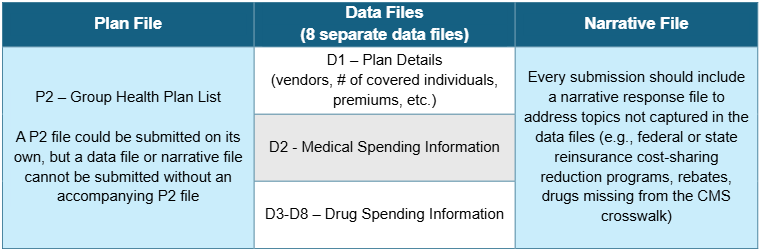
Most employer-sponsored health plans rely heavily on their carriers, TPAs, and PBMs to provide the data necessary to report to CMS. Many vendors will submit the reporting on behalf of employer client plans. However, some vendors may choose to instead provide the data to the employer with the expectation that the employer will submit their own data to CMS. Any organization that submits data to CMS is referred to as a “reporting entity.”
It is possible that multiple reporting entities will submit files separately on behalf of a single group health plan to provide CMS with all required data and files. In some cases, separate vendors may include the employer’s data in the same file type (e.g., a PBM and a separate specialty drug vendor must both report their drug data for the year in files D3-D8, or separate TPAs/PBMs within the same plan year must each submit files D1-D2). This relieves the employer from having to collect and consolidate the information from separate vendors into a single data file (although that is an option as well). For carriers, TPAs, PBMs, and other vendors who handle the RxDC reporting on behalf of group health plans, most will submit aggregated data for all of their clients and will not provide plan-specific data to CMS or the employer.
Note: For employers that changed vendors during the reference year (e.g., due to a non-calendar year plan), the reporting submission must reflect all plan data from the reference year. This means the employer will need to confirm with all service vendors involved with the employer’s group health plan(s) during the reference year that all required data will be submitted.
As an industry, how carriers, TPAs, PBMs, and other vendors of prescription drug coverage handle RxDC reporting still varies. Some of the more common approaches are set forth below:
Listed below is more information to help employers who need to submit their own D1 file, or for employers who are asked to provide information to carriers or TPAs filing the D1 on their behalf.
Regardless of whether a plan is fully-insured or self-funded, the employer will generally have to provide information to the carrier or TPA about average monthly premiums paid by the employer and by plan participants (because vendors often will not have this information). There is a 2-step process for calculating the average monthly premiums, described below.
Step 1: Calculate Total Premiums Paid by Members and by the Employer
Fully-Insured Plans
Add up all premiums paid by plan participants (“members”) over the course of the reference year, regardless of plan option, coverage tier, or rate structure. Then do the same for all premiums paid by the employer.
Self-Funded Plans
Add up all contributions paid by members over the course of the reference year, regardless of plan option, coverage tier, or rate structure. For the employer’s portion, first calculate the total cost of providing the self-funded coverage and then subtract the contributions paid by members. To calculate the total cost of providing self-funded coverage:
The process is similar to calculating the COBRA premium, except CMS expects the employer to use actual costs for the year, not expected costs (and don’t include the 2% admin fee).
Step 2: Calculate Average Monthly Premiums by Members and by the Employer
***Always divide by 12 months, even if the coverage was not in effect for the entire calendar year.
In most cases, an employer should end up with a single amount for the Average Monthly Premium Paid by Members and Employer, regardless of how many plans, coverage tiers, or rate structures it maintains. The exception would be if the employer (or the carrier or TPA on the employer’s behalf) is required to report different plans on different lines in the D1 file. This may occur, for example, if the employer offers different plans from different carriers or TPAs, or if the employer offers a mix of self-funded and fully-insured plans. In that case, the employer will need to calculate a separate Average Monthly Premium for each plan required to be reported on a separate line of the D1 file.
How concerned should an employer be with getting this calculation exactly right? While employers should do their best to provide an accurate answer, any minor errors in the calculation are unlikely to be significant. A carrier or TPA filing a D1 is required to aggregate the Average Monthly Premium across its entire book of business by state and market segment. In other words, CMS will generally not see any one employer’s data, but rather an average across potentially thousands of employers. Therefore, a small error in one employer’s data will not have a significant impact on the overall data being reported.
For those employers who must complete their own D1, or whose carrier/TPA requests additional information, here are some pointers on how to complete the remaining D1 fields:
| Field Name | Notes |
|---|---|
| Company Name (Formerly Issuer or TPA Name/EIN) | This should be the name and EIN of the insurance company that issues the fully-insured policy or the TPA who administers the self-funded plan. Do not enter the employer’s name and number unless the plan is both self-funded and self-administered. Do not enter more than one name or number – if there were multiple issuers/TPAs in the same year, they must be entered on separate lines. |
| Aggregation State | For a fully-insured plan, enter the two-letter postal code for the state where the policy was issued. For a self-funded plan, enter the two-letter postal code for the state of the employer’s principal place of business. |
| Market Segment | The market segments for group plans are: small group market, large group market, self-funded small employer plans, and self-funded large employer plans. Use the definition of “small” used in your state to identify the small group fully-insured market (typically less than 50 employees), even for a self-funded plan. Do not enter more than one market segment – if the employer offers multiple plans in different segments (e.g., both a self-funded and fully-insured plan), they should be listed on different lines. |
| Life Years | Calculate Member Months / 12. Report the result to the 8th decimal place. To calculate Total Member Months, choose one day of the month and use it consistently. For each month, determine how many members were enrolled in each plan sponsored by the employer on the chosen day of that month, and then add up the 12 monthly member counts. “Members” include enrolled active employees plus all dependents, COBRA enrollees, retirees, etc. |
| Earned Premium | This is the total amount of premiums paid to the insurance company for a fully-insured plan during the reference year; this field should be blank for a self-funded plan. This should be the same number used in the numerator when calculating Average Monthly Premiums. Do not reduce the premium to reflect MLR or other similar rebates. |
| Premium Equivalents | This is the total cost of providing self-funded coverage for the year; this field should be left blank for a fully-insured plan. To calculate the total cost of providing self-funded coverage, first add claims costs, administrative costs, ASO and other TPA fees, and stop-loss premiums. Then subtract any stop-loss reimbursements and prescription drug rebates. Use the same costs that are used to calculate the COBRA premium, except CMS expects the employer to use actual costs for the year, not expected costs (and don’t include the 2% admin fee). This should be the same number used in the numerator when calculating Average Monthly Premiums. |
| ASO/TPA Fees Paid | Report total ASO/TPA fees paid for a self-funded plan for the reference year – this amount should also be included in the premium equivalents amount. This field should be left blank for a fully-insured plan. |
| Stop-Loss Premiums Paid | Report total stop loss premiums paid for a self-funded plan for the reference year – this amount should also be included in the premium equivalents amount. This field should be left blank for a fully-insured plan. |
 Medicare Part D Creditable Coverage Notices: What Employers Need to Know Before October 15
Oct 8, 2026
Medicare Part D Creditable Coverage Notices: What Employers Need to Know Before October 15
Oct 8, 2026
 Leave Management Has Become a Workforce Strategy Issue
Oct 5, 2026
Leave Management Has Become a Workforce Strategy Issue
Oct 5, 2026
 Gag Clause Attestations: Due by December 31
Oct 5, 2026
Gag Clause Attestations: Due by December 31
Oct 5, 2026
 Maryland Paid Family & Medical Leave Insurance (FAMLI) LawEmployer Action Steps and Key Deadlines
Sep 30, 2026
Maryland Paid Family & Medical Leave Insurance (FAMLI) LawEmployer Action Steps and Key Deadlines
Sep 30, 2026